Concepts
Location
A location is an independent unit of cloud capacity — a data centre (or a cluster of hardware) that can host your resources. It is the most fundamental unit in the platform: every cloudspace, VM, disk, objectspace and cluster you create lives in exactly one location, and resources in different locations cannot share a private network.
Each location has its own:
- Prices for the billing units.
- Images: VM images and CD-ROM images.
- External networks.
- Storage classes.
- Backup workers.
- Role access (roles and their permissions at the location).
These are the tabs (VM IMAGES, CDROM IMAGES, ROLES & PERMISSIONS, WORKERS, EXTERNAL NETWORKS, STORAGE CLASSES) on the location's detail page.
A location is delivered by a G8 node (the platform's cloud-management software running on the underlying hardware). Your operator may run locations on their own infrastructure, or you can bring your own hardware as a freemium location.
Cloudspace
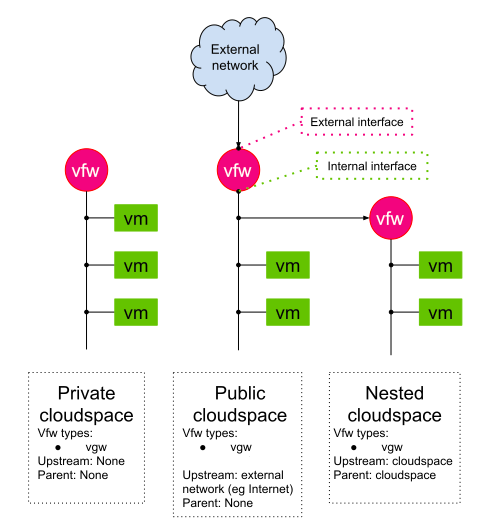
A Cloudspace is an isolated Virtual Network (Layer 2) where you can deploy cloud resources. The resources inside a single Cloudspace share the same internal virtual network subnet. In the presence of an external network connection, the cloud resources also share the external interface of the Cloudspace Virtual Firewall (VFW).
Depending on the virtual network configuration, three types of Cloudspaces are supported.
- A Private Cloudspace is a Cloudspace wherein a VFW has no interface access to the external network. Such a Cloudspace is isolated from the outside world.
- A Public Cloudspace is a Cloudspace wherein a VFW is connected to an external network. Public does not necessarily mean connected to the internet.
- A Nested cloud space is a Cloudspace wherein the external network interface of the VFW is part of a virtual private network of another Cloudspace.
The picture below illustrates the networking between the Cloudspaces.
Virtual machine (VM)
A Virtual Machine (VM) is a virtual server in whitesky.cloud NV used for running applications. A VM is created inside a certain Cloudspace, however it can be moved between Cloudspaces. A Cloudspace cannot be deleted if it contains VMs, therefore before deleting a Cloudspace, make sure to delete all the VMs inside it.
Virtual Firewall (VFW)
A Virtual Firewall is a network firewall for a Cloudspace private network. The VFW type can be chosen prior to creating a new Cloudspace.
VFW types:
- Virtual Gateway All routing features are API driven but with a limited set of features.
- Custom Firewall Configure a custom firewall of your choice. To find out more about Custom VFW, see Creating Custom Virtual Firewalls.
Objectspaces
An Objectspace is an object storage exported via the commonly used S3 protocol. Objectspaces allow you to store large amounts of unstructured blobs of data ( images, videos, text files, HTML files..) or any blob of bytes.
An Objectspace can be connected to one or more Cloudspaces, however, Cloudspaces with overlapping networks cannot connect to the same Objectspace.
Objectspaces are compatible with S3 where you can create buckets inside your Objectspace to store and serve files. An Objectspace can be publicly exposed via reverse-proxies.
Containerspaces
A Containerspace is a container management platform that provides our customers with the tools and services they need to deploy, manage, and maintain their Kubernetes clusters, containerized applications and infrastructure.
With Rancher integration, containerspaces provides our customers with a perfect automated way to manage Kubernetes clusters on whitesky.cloud NV portal.
Learn more about how to use Containerspaces to deploy applications on Kubernetes clusters.
DNS
DNS translates human-readable domain names (for example, try.whitesky.cloud) to machine-readable IP addresses. The DNS functionality on whitesky.cloud NV portal allows you to automatically create DNS records for your resources.
By default, customers will get a subdomain of the whitesky.cloud NV top level domain generated from their IDs. Customer admins are allowed to configure specific top level domains, edit the customer's top level part and configure DNS records. Plus, adding and deleting DNS records to their top level domains or subdomains of these domains.
Ingress
Ingress ensures that your Cloudspace can be accessed by the outside world. It keeps your services available and consistent with the requests coming from external services and clients.
The external traffic could be via Hypertext Transfer Protocol (HTTP) or Hypertext Transfer Protocol Secure (HTTPS). Ingress allows you to create Server Pools, Reverse Proxies and Load Balancers.
Port Forward
Port Forwarding is used when you need to expose services on your VMs to users outside of your internal network. An example would be a virtual machine running a web server, where users need to forward to port 80 in this VM.
A Port Forward is a mapping of ports. It maps an external port of a VFW to an internal IP address and port of a VM inside the private virtual network managed by this VFW. Port Forward functionality allows the VMs to be accessed from the outside world by TCP or UDP.
Disk Storage
whitesky.cloud NV supports two types of disks:
- Boot disk: where the OS of the VM is running.
- Data disk: where you can store data.
The VM, by default, contains a boot disk for the OS. This is served by a resource pool that is optimized for storage reuse. It's recommended to attach additional (one or more) data disks to a VM as they are served by another resource pool that is optimized for higher performance, higher IOPs and throughput. Max IOPs rate can be optimized per disk level.
External network
An external network is a network outside your cloudspaces, for example the internet or your company network. A cloudspace whose virtual firewall is connected to one is a public cloudspace. External networks belong to a location and are provided by your operator: the EXTERNAL NETWORKS tab of a location is read-only, so to get another external network, contact your operator. See Cloudspace Networking.
Storage Classes
A storage class is a named storage backend of a cloud location. Disks and virtual machine disks are created on a storage class, which determines how the data is stored, the performance characteristics and the billing units consumed. Depending on the location hardware configuration, available storage classes may include: software defined storage, physical storage and external storage. You choose the storage class when creating disks or virtual machines, and the available classes are listed under the Storage Classes tab of each location.
Each class carries an SU multiplier that scales how the storage is billed: a multiplier above 1.0 costs more per GiB but does not change the capacity you get. The default class (whitesky.cloud SDS) has a multiplier of 1.0. See Billing & Resource Units for the multiplier and Disks for choosing a class.
Image
An Image in a location is an OS image used to create VMs. Several commonly used Images are accessible in each location. As an Admin you can add your own VM images and CD-ROM images from the location's detail page, on the VM IMAGES tab (ADD VIRTUAL MACHINE IMAGE) and the CDROM IMAGES tab (ADD CDROM IMAGE).
Snapshot
A Snapshot is a logical copy of the state of a disk at a particular point in time. Snapshots are used to roll back disks of a VM to a desirable state.
Learn more about how you can clone a VM from a Snapshot.
Network interfaces
By default, a newly created VM has an interface that is connected to the isolated virtual network of a cloudspace. An additional external network interface can be attached to any VM to have an external IP. This happens through attaching a new NIC to your VM and reserving an external IP for you. You can then ssh into your VM and add that reserved IP to your new NIC.
Anti-affinity groups
An anti-affinity rule places a group of virtual machines across different physical hosts, which prevents all virtual machines from failing at once when a single host fails.
Anti-affinity groups are created for VMs within the same cloudspace.
vGPU
A vGPU (virtual GPU) is a slice of a physical GPU that you attach to a VM for GPU-accelerated workloads such as graphics, CAD or inference. vGPU profiles are offered where the underlying hardware supports them; you allocate one from the vGPUs section and attach it to a VM. vGPUs are billed as VGU units.
VDI
VDI (Virtual Desktop Infrastructure) delivers Windows desktop environments to end users over RDP. An administrator defines a VDI profile — VM template, pool size, session behaviour (single-use or dedicated) and connection mode — and end users connect through the VDI agent or an RD Gateway. See VDI for details.
Backups
Backups are automated, encrypted, deduplicated snapshots of a VM's disks, stored on S3-compatible backup targets and scheduled by backup policies (cron schedule and retention flags). A VM can have several policies at once. Cloud administrators control whether customers may define their own policies at the location level. See Backups.
Recycle Bin
The Recycle Bin collects deleted resources (cloudspaces, objectspaces, VMs, disks, buckets, images and vGPUs) so they can be recovered before permanent removal. They are kept for 7 days by default; your operator can change this, so the period on your platform may differ. See Recycle Bin.
Capacity Units
Billing is based on capacity units consumed by your resources. Invoices pro-rate over the actual number of days in the billing period, and resources are metered hourly. The 30-day figure applies to the spendings/BI view.
The canonical reference for all billing units (CU, VCU, MU, SU, OU, TU, PIU, WU, NU, VGU, FSU) and the factors that affect your consumption is the Billing & Resource Units guide.
Data retention policy
- The billing records are kept per Account for the last 3 months.
- Audits of GET type are kept for 7 days, while PUT, POST, and DELETE audits are retained for 364 days.
- Recycle bin items are retained for 7 days by default before being cleaned up. Your operator can change this period.
- Disk snapshots:
- By default, the last 24 snapshots are retained for hourly snapshots.
- By default, the last 14 snapshots are kept for daily snapshots.
Roles and service accounts
Access is granted through roles. A role has permissions, and a service account is an account attached to roles, used for automation. See Roles & Permissions, Service Accounts and Roles at a Glance.
Support
When you need help, use the Support item in the left navigation menu. It shows how to reach your operator's help desk for the selected customer. For billing questions, resource limits or requests such as additional external networks or storage classes, contact your operator through the same channel — these are configured by the operator, not self-served in the portal.